Ingress Mode
Steward supports exposing Tenant Control Planes through an Ingress Controller, allowing multiple tenants to share a single IP address. This eliminates the need for individual LoadBalancer services per tenant, significantly reducing infrastructure costs and IP address consumption.
Overview
LoadBalancer Mode (Default)
In the default LoadBalancer mode, each Tenant Control Plane gets its own LoadBalancer Service with a dedicated external IP address.
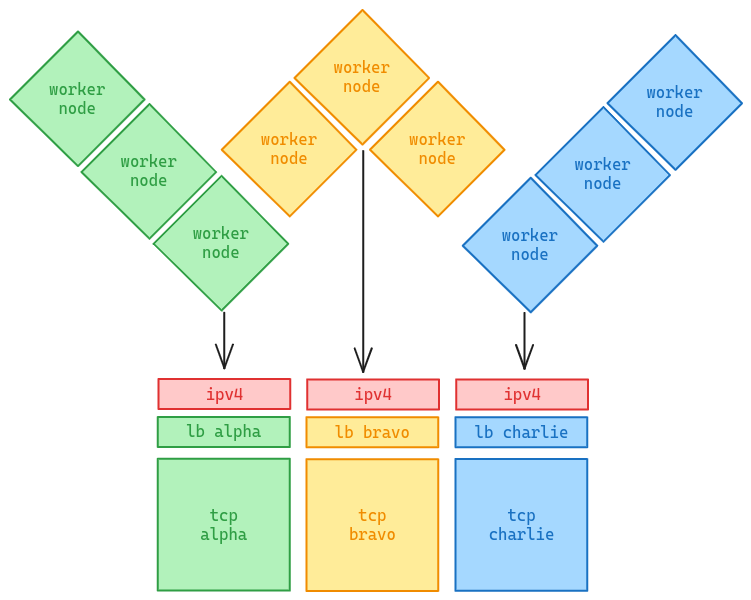
This approach is simple but has drawbacks:
- IP address consumption: Each tenant requires a unique IP
- Cost: Cloud LoadBalancers incur per-instance costs
- IPv4 scarcity: Limited availability of public IPv4 addresses
Ingress Mode
Ingress mode routes traffic to multiple Tenant Control Planes through a single Ingress Controller using SNI (Server Name Indication) for TLS passthrough.
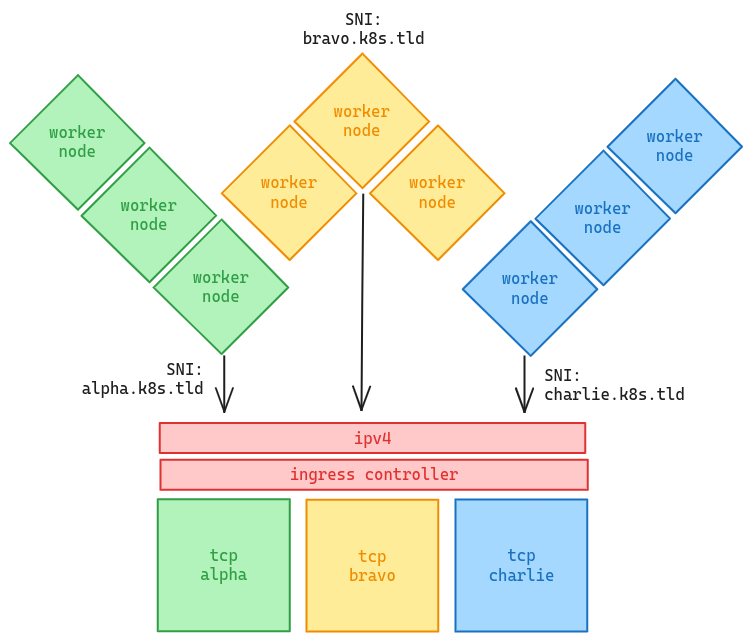
Benefits:
- Single IP: All tenants share the Ingress Controller's IP
- Cost effective: One LoadBalancer for unlimited tenants
- Hostname-based routing: Each tenant gets a unique hostname
The Challenge
When tenant worker nodes try to access their API server via kubernetes.default.svc, the traffic goes through the CNI which operates at L4 (TCP/IP). This means:
- No
Hostheader is sent (it's raw TCP, not HTTP) - The Ingress Controller cannot route based on hostname
- The connection fails
The Solution: tcp-proxy
Steward solves this with the tcp-proxy addon, which runs inside each tenant cluster:
- tcp-proxy rewrites the
kubernetesEndpointSlice to point to itself - When pods connect to
kubernetes.default.svc:443, traffic goes to tcp-proxy - tcp-proxy terminates TLS and re-establishes a connection to the Ingress Controller with proper SNI
- The Ingress Controller routes to the correct Tenant Control Plane based on SNI
This is transparent to applications - they connect to kubernetes.default.svc as usual.
Supported Ingress Controllers
| Controller | Type | TLS Passthrough Method |
|---|---|---|
| Traefik | traefik | IngressRouteTCP CRD (native support) |
| HAProxy | haproxy | haproxy.org/ssl-passthrough annotation |
| NGINX | nginx | nginx.ingress.kubernetes.io/ssl-passthrough annotation |
| Generic | generic | Manual annotation configuration |
Configuration
Complete Example
apiVersion: steward.butlerlabs.dev/v1alpha1
kind: TenantControlPlane
metadata:
  name: tenant-01
  namespace: tenants
spec:
  kubernetes:
    version: v1.31.0

  networkProfile:
    address: tenant-01.k8s.example.com
    port: 443
    certSANs:
      - tenant-01.k8s.example.com
      - tenant-01.konnectivity.example.com
    podCidr: 10.244.0.0/16
    serviceCidr: 10.96.0.0/16

  controlPlane:
    deployment:
      replicas: 2

    service:
      serviceType: ClusterIP

    ingress:
      hostname: tenant-01.k8s.example.com
      ingressClassName: traefik
      controllerType: traefik

  addons:
    tcpProxy: {}

    konnectivity:
      agent:
        extraArgs:
          - --proxy-server-host=tenant-01.konnectivity.example.com
          - --proxy-server-port=443
Required Settings
1. Service Type
Use ClusterIP instead of LoadBalancer:
spec:
  controlPlane:
    service:
      serviceType: ClusterIP
2. Ingress Configuration
spec:
  controlPlane:
    ingress:
      hostname: tenant-01.k8s.example.com
      ingressClassName: traefik
      controllerType: traefik  # traefik, haproxy, nginx, or generic
3. tcp-proxy Addon
Enable the tcp-proxy addon:
spec:
  addons:
    tcpProxy: {}
For advanced configuration:
spec:
  addons:
    tcpProxy:
      image: ghcr.io/butlerdotdev/steward-tcp-proxy:latest
      resources:
        requests:
          cpu: 10m
          memory: 32Mi
        limits:
          cpu: 100m
          memory: 64Mi
      hostAliases:
        - ip: 10.0.0.50
          hostnames:
            - tenant-01.k8s.example.com
            - tenant-01.konnectivity.example.com
      internalEndpoint: 10.40.0.201  # Management cluster node IP reachable from workers
| Field | Description |
|---|---|
image | Custom container image for tcp-proxy |
resources | CPU/memory requests and limits |
hostAliases | Hostname-to-IP mappings for bootstrap (before CoreDNS) |
internalEndpoint | Direct IP to reach API server; used when LoadBalancer IP is unavailable |
4. Certificate SANs
Include the Ingress hostnames in the certificate SANs:
spec:
  networkProfile:
    certSANs:
      - tenant-01.k8s.example.com
      - tenant-01.konnectivity.example.com  # if using konnectivity
!!! note "Automatic SANs"
Steward automatically includes the standard Kubernetes service names in the API server certificate:
kubernetes, kubernetes.default, kubernetes.default.svc, kubernetes.default.svc.cluster.local
Infrastructure Requirements
DNS Configuration
Configure wildcard DNS records pointing to your Ingress Controller's IP. Each tenant gets a unique hostname (e.g., tenant-01.k8s.example.com), and wildcard DNS ensures all tenants resolve to the shared Ingress Controller.
*.k8s.example.com             A   <INGRESS_CONTROLLER_IP>
*.konnectivity.example.com    A   <INGRESS_CONTROLLER_IP>
Enterprise DNS Examples
=== "Windows Server DNS / Active Directory"
```powershell
# PowerShell - Create zone and wildcard record
Add-DnsServerPrimaryZone -Name "k8s.example.com" -ZoneFile "k8s.example.com.dns"
Add-DnsServerResourceRecordA -ZoneName "k8s.example.com" -Name "*" -IPv4Address "10.0.0.50"

# For Konnectivity (pod exec/logs)
Add-DnsServerPrimaryZone -Name "konnectivity.example.com" -ZoneFile "konnectivity.example.com.dns"
Add-DnsServerResourceRecordA -ZoneName "konnectivity.example.com" -Name "*" -IPv4Address "10.0.0.50"
```
=== "BIND"
```bash
# /etc/bind/zones/k8s.example.com
$TTL 86400
@   IN  SOA ns1.example.com. admin.example.com. (
        2024020901 ; Serial
        3600       ; Refresh
        1800       ; Retry
        604800     ; Expire
        86400 )    ; Minimum TTL

    IN  NS  ns1.example.com.
*   IN  A   10.0.0.50
```
=== "Infoblox"
Create a Host Record with:

- **Name**: `*.k8s.example.com`
- **IP Address**: `<INGRESS_CONTROLLER_IP>`
- **Enable**: DNS Host Record
=== "dnsmasq / Pi-hole"
```bash
# Add to /etc/dnsmasq.d/butler.conf
address=/.k8s.example.com/10.0.0.50
address=/.konnectivity.example.com/10.0.0.50
```
=== "CoreDNS"
```yaml
# Corefile addition
k8s.example.com:53 {
    template IN A {
        answer "{{ .Name }} 60 IN A 10.0.0.50"
    }
}
```
Cloud/Remote Access Options
For accessing tenant clusters from outside your network:
=== "Cloudflare Tunnel (Recommended)"
Cloudflare Tunnel exposes internal services without public IPs:

```yaml
# cloudflared config.yml
tunnel: <tunnel-id>
ingress:
  - hostname: "*.k8s.example.com"
    service: https://<INGRESS_CONTROLLER_IP>:443
    originRequest:
      noTLSVerify: true
  - hostname: "*.konnectivity.example.com"
    service: https://<INGRESS_CONTROLLER_IP>:443
    originRequest:
      noTLSVerify: true
  - service: http_status:404
```

Then add CNAME records in Cloudflare DNS:

```
*.k8s.example.com            CNAME   <tunnel-id>.cfargotunnel.com
*.konnectivity.example.com   CNAME   <tunnel-id>.cfargotunnel.com
```
=== "Public IP + NAT"
If your Ingress has a public IP (via NAT/port forwarding):

```
*.k8s.example.com    A    <PUBLIC_IP>
```

Ensure port 443 is forwarded to your Ingress Controller.
=== "Cloudflare Zero Trust"
For team-based access with WARP client:

1. Create a private network in Cloudflare Zero Trust
2. Add Split Tunnel rule for `k8s.example.com`
3. Configure Private DNS: `*.k8s.example.com` → `<INGRESS_CONTROLLER_IP>`
4. Team members connect via WARP client
Testing DNS Resolution
# Verify wildcard resolution
nslookup tenant-01.k8s.example.com
dig +short any-tenant.k8s.example.com

# Quick test with /etc/hosts (development only)
echo "<INGRESS_IP>  tenant-01.k8s.example.com" | sudo tee -a /etc/hosts
Ingress Controller Setup
Traefik
Traefik requires the IngressRouteTCP CRD for TLS passthrough. Steward automatically creates these when controllerType: traefik is specified.
Ensure Traefik is configured with an entrypoint on port 443:
# Traefik Helm values
ports:
  websecure:
    port: 8443
    exposedPort: 443
    expose: true
    protocol: TCP
HAProxy
Ensure HAProxy Ingress Controller supports SSL passthrough:
# HAProxy Helm values
controller:
  config:
    ssl-passthrough: "true"
NGINX
Enable SSL passthrough in NGINX Ingress Controller:
# NGINX Helm values
controller:
  extraArgs:
    enable-ssl-passthrough: "true"
Konnectivity (Optional)
If using Konnectivity for API server to node communication, configure the agent to use the Ingress:
spec:
  addons:
    konnectivity:
      agent:
        extraArgs:
          - --proxy-server-host=tenant-01.konnectivity.example.com
          - --proxy-server-port=443
How It Works
Traffic Flow
- Pod in tenant cluster connects to
kubernetes.default.svc:443 - kube-proxy routes to tcp-proxy pods (via rewritten EndpointSlice)
- tcp-proxy terminates TLS using the API server certificate
- tcp-proxy opens new TLS connection to Ingress with correct SNI hostname
- Ingress Controller routes based on SNI to the correct TCP service
- API Server processes the request
tcp-proxy Components
When enabled, Steward automatically:
- Sets
--endpoint-reconciler-type=noneon the API server (prevents conflicts with tcp-proxy) - Deploys into the tenant cluster:
- Deployment: 2 replicas with hostNetwork for bootstrap
- Service: ClusterIP service in kube-system namespace
- ServiceAccount/RBAC: Permissions to manage the kubernetes EndpointSlice
- TLS Secret: Copy of API server certificate for TLS termination
Bootstrap Sequence
tcp-proxy is designed to work before CNI is ready:
- Uses
hostNetwork: trueto communicate without CNI - Tolerates
node.kubernetes.io/not-readyandnode.cilium.io/agent-not-readytaints - Uses
hostAliasesto resolve Ingress hostname before CoreDNS is available - Priority class
system-cluster-criticalensures scheduling priority
Air-Gapped Environments
The tcp-proxy image can be customized for private registries:
spec:
  addons:
    tcpProxy:
      image: private.registry.example.com/steward-tcp-proxy:latest
Troubleshooting
Pods can't reach kubernetes.default.svc
-
Check tcp-proxy is running:
kubectl --kubeconfig=<tenant-kubeconfig> get pods -n kube-system -l app=steward-tcp-proxy -
Verify the kubernetes EndpointSlice:
kubectl --kubeconfig=<tenant-kubeconfig> get endpointslice -n default kubernetes -o yaml -
Check tcp-proxy logs:
kubectl --kubeconfig=<tenant-kubeconfig> logs -n kube-system -l app=steward-tcp-proxy
TLS/Certificate Errors
-
Verify certificate SANs include
kubernetes.default.svc.cluster.local:openssl s_client -connect <tcp-ip>:6443 </dev/null 2>/dev/null | openssl x509 -noout -text | grep -A1 "Subject Alternative Name" -
Check the TLS secret exists in tenant cluster:
kubectl --kubeconfig=<tenant-kubeconfig> get secret -n kube-system steward-tcp-proxy-tls
Ingress Not Routing
-
For Traefik, verify IngressRouteTCP was created:
kubectl get ingressroutetcp -n <tcp-namespace> -
For HAProxy/NGINX, verify Ingress and annotations:
kubectl get ingress -n <tcp-namespace> -o yaml -
Check Ingress Controller logs for routing issues
Comparison: LoadBalancer vs Ingress Mode
| Aspect | LoadBalancer Mode | Ingress Mode |
|---|---|---|
| IP addresses | One per tenant | One for all tenants |
| Cost | Higher (per-LB costs) | Lower (single LB) |
| Setup complexity | Simple | Moderate |
| DNS requirements | Per-tenant A records | Wildcard A records |
| Ingress Controller | Not required | Required |
| tcp-proxy | Optional | Required |