Try Butler on Your Laptop
Run the full Butler platform on your laptop with nothing but Docker. No hypervisor, no cloud account, no hosted services. In a few minutes you get a real management cluster, the web console, and a tenant Kubernetes cluster with a node you can kubectl into.
This is the fastest way to see what Butler does. The only thing that differs from a production install is the layer beneath the abstraction: tenant nodes run as local containers via the Cluster API Docker provider instead of VMs on Harvester, Nutanix, or a cloud. Everything above that line -- the control plane, hosted tenant control planes, console, teams, RBAC, and addons -- is the same software you run in production.
TL;DR
brew install butlerdotdev/tap/butler
butleradm bootstrap local
# then open http://localhost:8080 and sign in with the credentials it prints
A few minutes later you have a Butler management cluster, the web console, and you are ready to create your first tenant Kubernetes cluster -- all on your laptop, with only Docker installed.
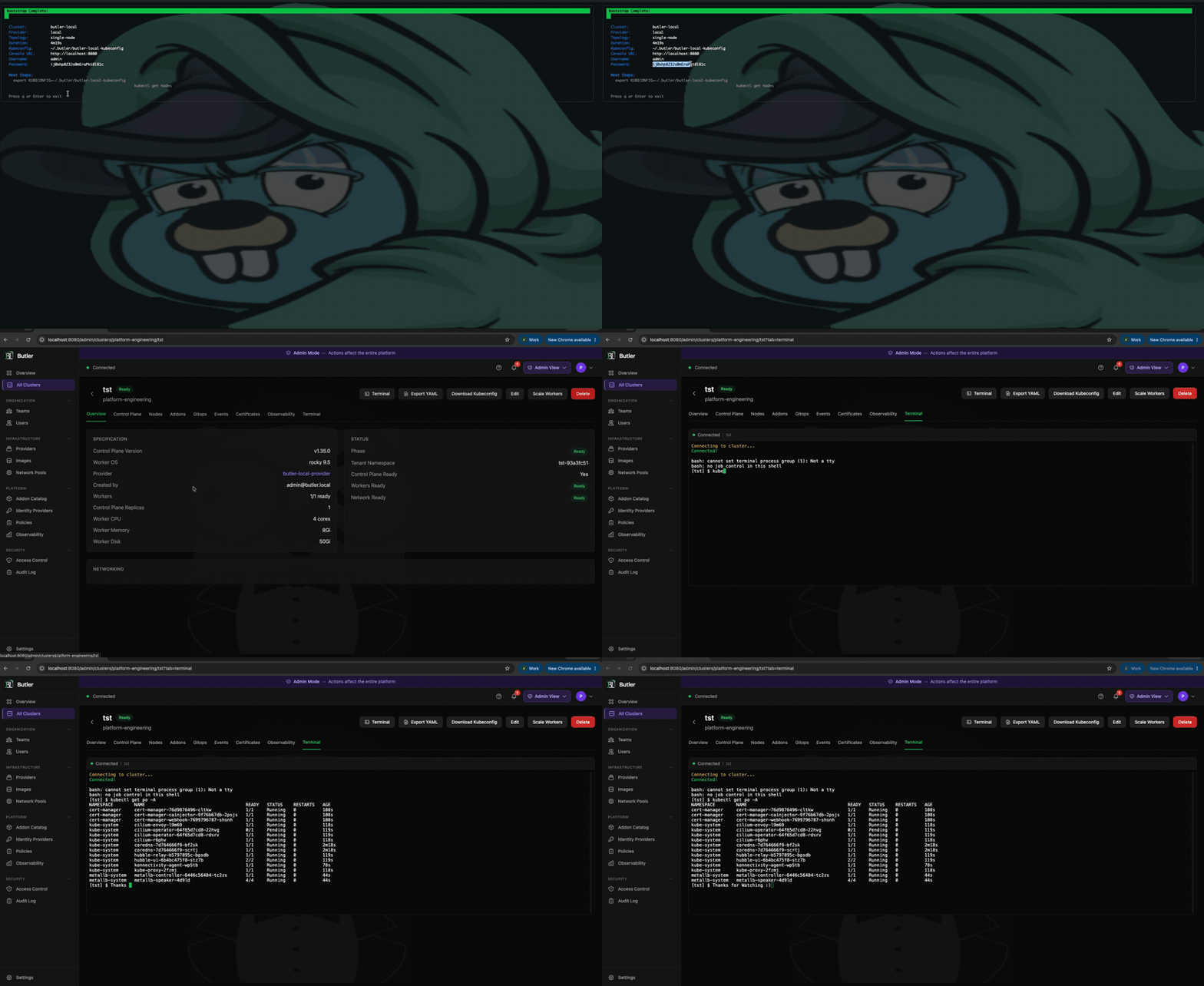
Prefer the full walkthrough? Watch the complete run -- bootstrap, console sign-in, creating a tenant cluster, and inspecting its nodes:
Prerequisites
| Requirement | Description |
|---|---|
| Docker | Docker Desktop or Rancher Desktop, with at least 4 CPUs and 6 GB of memory allocated |
| kubectl | Kubernetes CLI (1.28+) |
| Butler CLI | butleradm and butlerctl (install below) |
Allocate the resources in Docker Desktop (Settings -> Resources) or Rancher Desktop (Preferences -> Virtual Machine) before you start. Butler runs a management control plane plus a hosted tenant control plane on a single node, and the tenant apiserver needs the headroom.
1. Install the CLI
Homebrew (macOS / Linux)
brew install butlerdotdev/tap/butler
On macOS the binaries are not notarized yet, so Gatekeeper quarantines them on install and they will not run until you clear the flag once (after each install or upgrade):
xattr -rd com.apple.quarantine "$(brew --prefix)/Caskroom/butler"
The Direct Download option below is not quarantined, if you prefer to skip this step.
Direct Download (macOS / Linux)
OS=$(uname -s | tr '[:upper:]' '[:lower:]')
ARCH=$(uname -m)
[[ "$ARCH" == "x86_64" ]] && ARCH="amd64"
[[ "$ARCH" == "aarch64" ]] && ARCH="arm64"

curl -sLO "https://github.com/butlerdotdev/butler-cli/releases/latest/download/butler_${OS}_${ARCH}.tar.gz"
tar xzf butler_${OS}_${ARCH}.tar.gz
sudo mv butleradm butlerctl /usr/local/bin/
2. Bootstrap the Local Platform
butleradm bootstrap local
This stands up a local KIND cluster and installs the entire Butler platform onto it: Steward (hosted control planes), Cluster API with the Docker provider, cert-manager, Cilium, MetalLB, the Butler controller, and the web console. The first run takes a few minutes while images pull.
When it finishes, the CLI prints everything you need to sign in. No searching for secrets:
Butler Console:
  URL:      http://localhost:8080
  Username: admin
  Password: <generated>
Re-running butleradm bootstrap local deletes the previous local cluster and starts clean, so you can iterate freely.
3. Open the Console
Open http://localhost:8080 in your browser and sign in with the printed credentials. The admin user has full platform access out of the box -- the same access used to administer a production management cluster.
4. Create a Tenant Cluster
The local bootstrap runs in Optional multi-tenancy mode, so you can create a TenantCluster directly in the default butler-tenants namespace, no Team required. (For the full multi-team flow, see Create Your First Tenant Cluster.) Two things are specific to the local environment:
- Use the
butler-local-providerprovider config (the credential-less one the local bootstrap creates for you). - A single worker is plenty. The node comes up as a local container.
From the CLI:
butlerctl cluster create toy --provider butler-local-provider --workers 1
Watch it reach Ready:
export KUBECONFIG=~/.butler/butler-local-kubeconfig
kubectl get tenantcluster toy -n butler-tenants -w
The tenant transitions Pending -> Provisioning -> Installing -> Ready, typically in a couple of minutes.
5. See a Real Node
The management cluster is reachable from your host out of the box:
export KUBECONFIG=~/.butler/butler-local-kubeconfig
kubectl get nodes
Then pull the tenant's kubeconfig and talk to its control plane:
butlerctl cluster kubeconfig toy > toy.yaml
kubectl --kubeconfig toy.yaml get nodes
NAME                      STATUS   ROLES    AGE   VERSION
toy-workers-xxxxx-xxxxx   Ready    <none>   75s   v1.30.2
A real Ready node, running on your laptop, in a tenant Kubernetes cluster managed by Butler.
What Is Real and What Is Simulated
| Layer | Local | Production |
|---|---|---|
| Platform control plane (controllers, CRDs, auth, RBAC) | Real | Real |
| Web console and API server | Real | Real |
| Tenant control planes (apiserver, etcd, scheduler) | Real pods (Steward) | Real pods (Steward) |
| Teams, multi-tenancy, addons | Real | Real |
| Tenant worker nodes | Containers (CAPI Docker provider) | VMs (Harvester / Nutanix / cloud) |
| Node OS | kindest/node image | Talos Linux / kubeadm images |
| Storage | KIND local-path | Longhorn |
| Networking | Docker bridge + MetalLB | Provider network + IPAM |
| HA and scale | Single node | Multi-node, HA control plane |
Everything above the worker-node line behaves exactly as it does in production. To validate a specific infrastructure provider, an HA topology, Talos, or scale, bootstrap onto that infrastructure using the provider guides.
Tear Down
The next butleradm bootstrap local cleans up automatically, but to remove the local platform entirely:
kind delete cluster --name butler-bootstrap
If you do not have the kind CLI installed, remove the containers directly:
docker rm -f $(docker ps -aq --filter "label=io.x-k8s.kind.cluster=butler-bootstrap")
Tenant worker containers are named after their tenant clusters (for example toy-workers-*) and can be removed the same way.
Next Steps
- Create Your First Tenant Cluster -- The full Team and TenantCluster walkthrough.
- Butler Console -- Manage clusters, addons, and terminals from the web UI.
- Concepts -- Hosted control planes, multi-tenancy, and the addon system.
- Provider Guides -- Move from your laptop to real infrastructure.